What should be on a restaurant website?
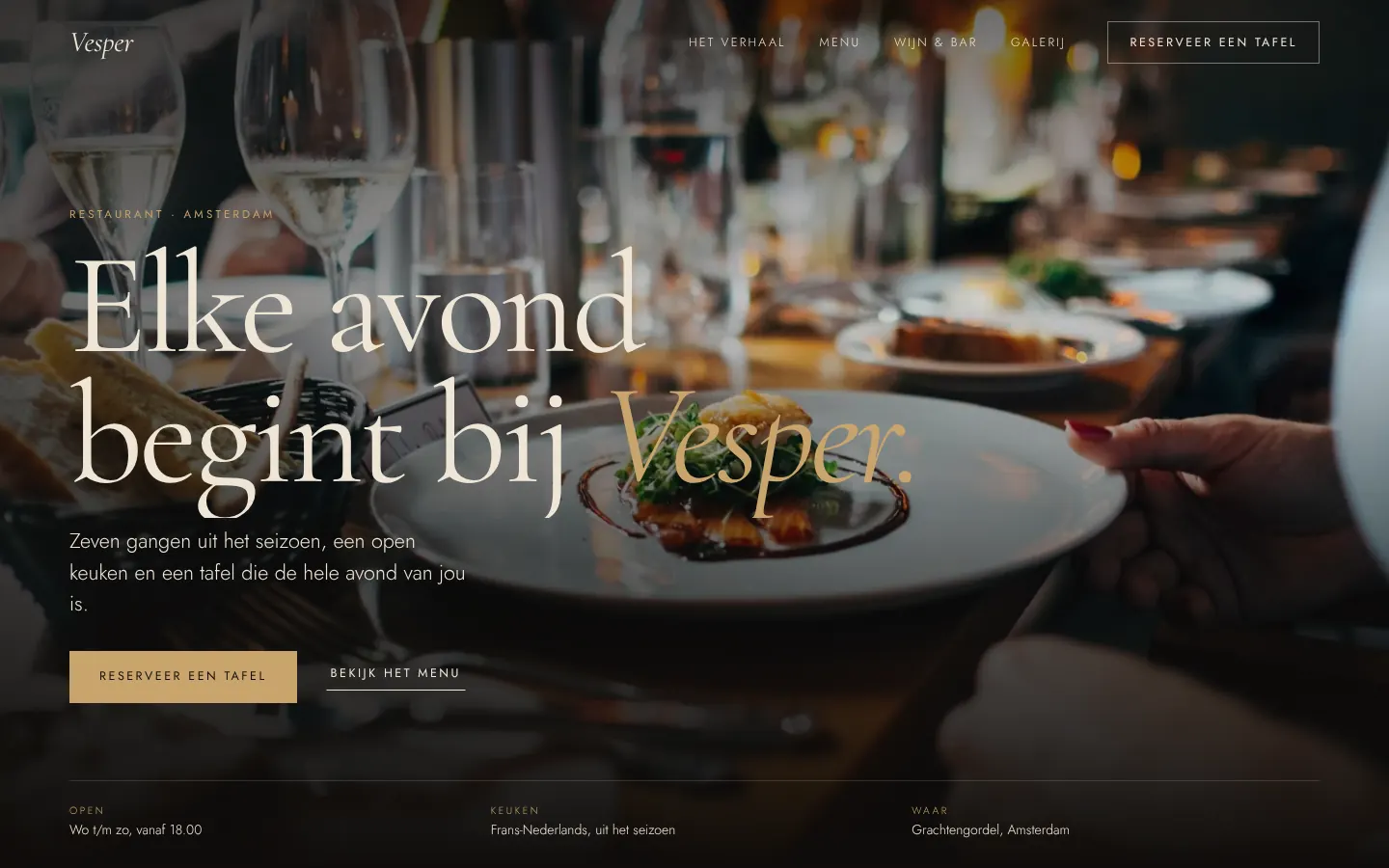
A restaurant website should at least have your menu as normal text, a way to book directly, up-to-date opening hours, your address with directions and photos that show what the place really looks like. On top of that, you tell guests how they can get information about allergens, and you make sure everything works on a phone, because that's where most people look when they're searching for a restaurant. Below we go through the points one by one, so you can check your own website or know what to ask for when you have one made.
What does a guest look for on your website?
Almost nobody reads a restaurant website from top to bottom. A guest comes with a question: are they open tonight, what's on the menu, roughly what does it cost, can I book and where do I park? Often they're already out on the street or on the sofa with their phone. Every question that isn't answered within a few taps is a reason to try the next restaurant in the search results.
That's why the top of the page should say in one sentence what kind of restaurant you are and where: "Italian restaurant on the harbour in Harderwijk, open Wednesday to Sunday". Directly below that, the button to book. Atmosphere matters, but a big video that has to load first while the guest doesn't yet know where they are costs you bookings.
The checklist: what should be on a restaurant website
- Your menu as text on the page. No PDF and no photo of the menu. You'll read why below.
- Booking in a few taps. A button that appears on every page and goes straight to your reservation system or form. If you only take bookings by phone, make the number tappable.
- Up-to-date opening hours. Including kitchen hours if they differ, and adjusted hours around public holidays and holiday periods.
- Address, directions and parking. A map, a link to directions and a sentence about parking or the nearest station.
- Real photos. Of your dishes, your dining room and your terrace. No stock photo of a pasta you don't serve.
- Information about allergens. Where guests can find it or how they can ask for it.
- Prices. On the menu, or at least an indication per course or set menu. Guests want to know beforehand whether you fit their budget.
- Groups and packages. If you have a room for parties or a lunch for businesses, give it its own block or page.
- Contact and company details. Phone number, email address and your Chamber of Commerce (KvK) number.
Why your menu belongs on the site as normal text
Many restaurants put their menu on the website as a PDF. Understandable, because the file already exists. On a phone, though, a PDF is awkward: zooming in, scrolling sideways and sometimes downloading it first. And such a file is easy to forget to update, so it ends up listing dishes that have been off the menu for months.
A menu as normal text (HTML) reads comfortably on any screen, loads quickly and also works with the screen readers that blind and partially sighted guests use. Search engines can read the text, so someone searching for "vegetarian restaurant" plus your town is more likely to end up on a page where your vegetarian dishes are actually listed. In your website's structured data you can also point to your menu; Google describes a menu property for this in its documentation on local businesses.
A few tips for the menu itself:
- For each dish, give the name, a short description and the price.
- Mark vegetarian and vegan dishes the same way everywhere.
- If your menu changes often, show that it's a sample menu and add the date.
Allergens: what the rules require
Guests with an allergy want to know beforehand whether they can eat safely with you. In the Netherlands, as a hospitality business you must be able to provide information about the fourteen allergens named in the law, including for dishes you prepare yourself. According to Royal Dutch Hospitality (Koninklijke Horeca Nederland), this may be done verbally or in writing. If you give the information verbally, it must also be available in writing or digitally, for your staff and for the NVWA, the Dutch food safety authority. In Belgium similar rules apply, which the FAVV, the Belgian food safety agency, explains.
Your website doesn't have to be the only place where that information is, but it does help. A short line by the menu, such as "Have an allergy? Just ask us for the allergen menu", removes doubt before someone books. If you offer online ordering or takeaway, find out what applies in that situation, because then the guest chooses their dish before they speak to you.
This article is not legal advice. If you're unsure what applies to your business, check with your industry association or the NVWA.
Your website and your Google profile belong together
Many guests see your Google Business Profile before your website: the panel with your name, stars, photos and opening hours in Google Search and Maps. Google lets restaurants show their menu and receive bookings there, among other things. Make sure the details in that profile are exactly the same as those on your website. If Google says you're open on Monday and your website says you're closed, the guest doesn't know who to believe.
A handy way to split it: the profile is the shop window, your website is the restaurant itself. The profile shows at a glance that you exist and are open. Your website gives room to the full menu, the story of your kitchen, group packages and the booking button. How to climb higher in the local results, you can read in getting found on Google.
Mobile, fast and easy to update
Test your website the way a guest uses it: open it on your own phone, on mobile data, and try to book a table for four within half a minute. If you can't do that without zooming in or searching, that's your first point to improve. Why this weighs so heavily, for Google too, you can read in why a mobile-friendly website matters.
Also look at how easily you can change things. A restaurant changes more often than most businesses: a new seasonal menu, a week closed in summer, a Christmas menu. Agree on how those changes will work before the website goes live, so that your menu and hours are still correct a year from now.
What a restaurant website from HOPI looks like
On our website you'll find Vesper, a demo design for a fictional restaurant. It shows how the points above come together: the menu as text, a booking button that's always in view and opening hours you don't have to search for. It's an example, not a client. What we make for restaurants, and what extras such as a digital menu or a link to your reservation system involve, is on the page website design for your restaurant.
Want to know what this would look like for your restaurant? We first make a free design of your own website, with your own name and opening hours in it. Only if you like it do you choose a package.
Request a free design and view your own restaurant on your phone.